
Polymarket API: The Complete Developer Guide
A developer's guide to the Polymarket API: discover markets with Gamma, read prices and place orders on the CLOB, stream fills, and read positions on Polygon.

Polymarket is not one API. It's three HTTP services plus an on-chain layer, and knowing which one to call for what is most of the battle. Market discovery, order books, trading, positions, and settlement each live in a different place, and the docs spread them across separate references.
This guide maps the whole surface and shows working calls for each: discover markets with the Gamma API, read prices and place orders on the CLOB, stream updates over WebSocket, and read positions and balances on Polygon. The reads are public and verified against the live APIs; the trading calls use the official SDK.
Note: Polymarket shipped CLOB V2 on April 28, 2026. Collateral moved to pUSD, order signing changed, and the legacy py-clob-client was retired. This guide uses py-clob-client-v2. Pin your versions.
What You Will Learn
- Which Polymarket API to call for markets, prices, trading, positions, and on-chain data
- Discover markets and outcome token IDs with the Gamma API
- Read live prices and order books from the CLOB API
- Authenticate and place or cancel orders
- Stream book and fill updates over WebSocket, and read positions on Polygon
Prerequisites
- Python 3.11+ (
python3 --version) - A Polygon RPC endpoint for on-chain reads. Get a free Polygon key from the Dwellir dashboard; we read it from
DWELLIR_POLYGON_URL. - For trading only: a Polygon wallet funded with pUSD and its private key.
pip install "py-clob-client-v2" web3 requests websocket-clientThe Polymarket API Surface
Four endpoints, four jobs:
| Surface | Base URL | Auth | Use it for |
|---|---|---|---|
| Gamma API | https://gamma-api.polymarket.com | None | Discover markets and events, get outcome token IDs |
| CLOB API | https://clob.polymarket.com | Public reads; keyed to trade | Prices, order books, placing and cancelling orders |
| Data API | https://data-api.polymarket.com | None | A wallet's positions, activity, and trades |
| Polygon RPC | your endpoint | Your key | Outcome-token and pUSD balances, settlement events |
Order matching happens off-chain on the CLOB; settlement happens on Polygon. That split is why a serious integration always pairs the CLOB with a Polygon RPC endpoint.
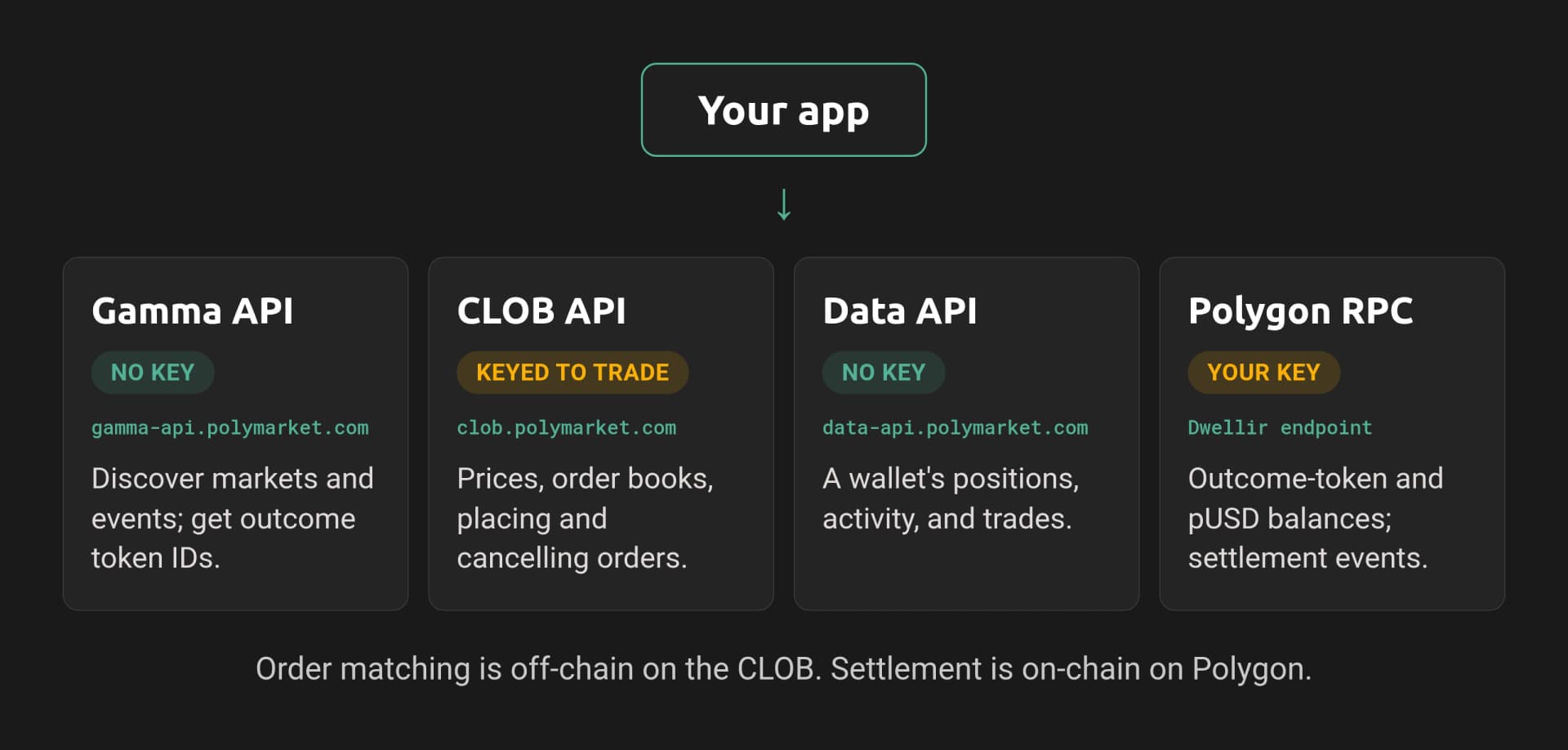
The Polymarket API surface shown in the image. Your app talks to:
- Gamma API - market discovery and outcome-token IDs (no key).
- CLOB API - prices, order books, and placing or cancelling orders (key required to trade).
- Data API - a wallet's positions, activity, and trades (no key).
- Polygon RPC (Dwellir) - outcome-token and pUSD balances and settlement events (your key).
Order matching is off-chain on the CLOB; settlement is on-chain on Polygon.
Discover Markets with the Gamma API
Everything starts with a market and its outcome token IDs. The Gamma API lists markets and events; no auth required.
# gamma.py
import requests

GAMMA = "https://gamma-api.polymarket.com"

def active_markets(limit: int = 20) -> list[dict]:
    resp = requests.get(
        f"{GAMMA}/markets",
        params={"active": "true", "closed": "false", "limit": limit},
        timeout=10,
    )
    resp.raise_for_status()
    return resp.json()

m = active_markets(1)[0]
print(m["question"])
print("conditionId:", m["conditionId"])
print("outcomes:", m["outcomes"])
print("token ids:", m["clobTokenIds"])New Rihanna Album before GTA VI?
conditionId: 0x...
outcomes: ["Yes", "No"]
token ids: ["98022490269692409998...", "53831553061883006530..."]The clobTokenIds array holds the two ERC-1155 token IDs, one per outcome. These are what every CLOB call expects as token_id. To go the other way and resolve a token ID back to its market, query ?clob_token_ids=<id>.
Read Prices and the Order Book
The CLOB serves prices and books publicly. Pass a token ID from Gamma.
# clob_reads.py
import requests

CLOB = "https://clob.polymarket.com"

def order_book(token_id: str) -> dict:
    return requests.get(f"{CLOB}/book", params={"token_id": token_id}, timeout=10).json()

def midpoint(token_id: str) -> float:
    return float(requests.get(f"{CLOB}/midpoint", params={"token_id": token_id}, timeout=10).json()["mid"])

book = order_book("98022490269692409998...")
print("best bid:", book["bids"][-1], "best ask:", book["asks"][-1])
print("tick size:", book["tick_size"], "neg_risk:", book["neg_risk"])
print("midpoint:", midpoint("98022490269692409998..."))best bid: {'price': '0.17', 'size': '5'} best ask: {'price': '0.24', 'size': '39.6'}
tick size: 0.01 neg_risk: False
midpoint: 0.205The book includes tick_size and neg_risk, both of which you need when placing an order. The /price?token_id=...&side=buy and /spread endpoints give quick single values without the full book.
Authenticate
The CLOB uses two auth levels. Level 1 is your wallet's private key, used once to derive API credentials. Level 2 is those credentials (key, secret, passphrase), sent on every trading request. The SDK handles both.
# client.py
import os
from py_clob_client.client import ClobClient

HOST = "https://clob.polymarket.com"

def make_client() -> ClobClient:
    client = ClobClient(HOST, key=os.environ["PRIVATE_KEY"], chain_id=137)
    client.set_api_creds(client.create_or_derive_api_creds())
    return client
Important: create_or_derive_api_creds is deterministic, so the same private key always returns the same credentials, no storage required. Confirm the exact method name against your installed py-clob-client-v2 version, since it has differed between releases.
Place and Cancel Orders
With a client, build an order from a token ID, price, size, and side. Match the market's tick size and neg-risk flag or the order is rejected.
# orders.py
from py_clob_client.clob_types import OrderArgs, OrderType, PartialCreateOrderOptions
from py_clob_client.order_builder.constants import BUY

def place_limit(client, token_id, price, size, neg_risk=False):
    return client.create_and_post_order(
        OrderArgs(token_id=token_id, price=price, size=size, side=BUY),
        PartialCreateOrderOptions(neg_risk=neg_risk),
        OrderType.GTC,  # rest on the book until filled or cancelled
    )

def cancel(client, order_id):
    return client.cancel(order_id)
Order types: GTC rests until filled or cancelled, GTD expires at a timestamp, and FOK/FAK fill immediately and cancel any remainder (use these for market-style orders). Read open orders with client.get_orders(...) and your fills with client.get_trades(...).
Note: Orders settle in pUSD. Before your first trade, approve the CTF Exchange (0xE111180000d2663C0091e4f400237545B87B996B) to spend pUSD, and call setApprovalForAll on the Conditional Tokens contract (0x4D97DCd97eC945f40cF65F87097ACe5EA0476045). If you hold bridged USDC.e, wrap it into pUSD through Polymarket's collateral onramp first.
Stream Updates over WebSocket
For live data, the CLOB WebSocket pushes book and trade updates. The market channel is public; the user channel carries your credentials and reports your fills.
# stream.py
import json, websocket

WS = "wss://ws-subscriptions-clob.polymarket.com/ws/market"

def stream_book(token_ids: list[str]):
    ws = websocket.create_connection(WS)
    ws.send(json.dumps({"assets_ids": token_ids, "type": "market"}))
    while True:
        msg = json.loads(ws.recv())
        print(msg.get("event_type"), msg.get("asset_id"))

stream_book(["98022490269692409998..."])
Market messages include book snapshots, price_change, and last_trade_price. For your own orders, connect to .../ws/user with your API credentials and the market condition IDs you care about, and you'll receive trade and order events. Send a PING roughly every 10 seconds to keep the socket alive.
Read Positions and Balances on Polygon
Two ways to see holdings. The Data API gives a rich, decoded view of any wallet's positions; Polygon RPC gives you the raw on-chain truth.
# positions.py
import os, requests
from web3 import Web3

DATA = "https://data-api.polymarket.com"
w3 = Web3(Web3.HTTPProvider(os.environ["DWELLIR_POLYGON_URL"]))
PUSD = Web3.to_checksum_address("0xC011a7E12a19f7B1f670d46F03B03f3342E82DFB")

def positions(address: str) -> list[dict]:
    return requests.get(f"{DATA}/positions", params={"user": address, "limit": 100}, timeout=10).json()

def pusd_balance(address: str) -> float:
    addr = Web3.to_checksum_address(address)
    data = "0x70a08231" + addr[2:].rjust(64, "0")  # balanceOf(address)
    return int(w3.eth.call({"to": PUSD, "data": data}).hex(), 16) / 1_000_000

for p in positions(os.environ["WALLET_ADDRESS"])[:3]:
    print(p["title"], p["outcome"], p["size"], "@", p["curPrice"], "redeemable:", p["redeemable"])
print("pUSD:", pusd_balance(os.environ["WALLET_ADDRESS"]))Will ETH close above $4k in June? Yes 120 @ 0.41 redeemable: False
pUSD: 142.50The Data API decodes positions into PnL, current price, and redeemable/mergeable flags, which is ideal for dashboards. The on-chain read (ERC-1155 balanceOf on the Conditional Tokens contract, or pUSD balanceOf as shown) is the source of truth your settlement logic should trust, and it goes through your Polygon RPC endpoint.
Going to Production
Pair the CLOB with Polygon RPC. Prices and orders come from the CLOB, but balances, fills, and resolutions are on-chain. Production integrations read both, and the Polygon RPC latency shows up directly in how fresh your position and settlement data is.
Handle V2 and pUSD explicitly. Verify approvals with allowance reads at startup, wrap USDC.e to pUSD as needed, and redeem resolved positions with redeemPositions so capital does not sit idle.
Respect undocumented rate limits. Polymarket does not publish hard CLOB rate limits; implement retry-with-backoff and treat HTTP 429 as a slow-down signal.
Pin your SDK. V2 changed order signing, so a stale client silently fails to place orders. Pin py-clob-client-v2 and test order placement on a small size before scaling.
Next Steps
- Build on these calls with our guide to a Polymarket copy-trading bot.
- New to the mechanics? Start with what a prediction market is and how Polymarket works.
- Choosing the Polygon endpoint underneath all of this? See the best Polygon RPC for Polymarket bots.
This guide read and traded against Polygon through a Dwellir endpoint. To run it yourself, create a free Dwellir account and point DWELLIR_POLYGON_URL at your Polygon endpoint.
Frequently Asked Questions
What can I do with the Polymarket API?
Discover markets with the Gamma API, read prices and the order book on the CLOB, place and cancel orders, stream fills over WebSocket, and read positions on Polygon.
Do I need authentication to place orders?
Yes. The guide covers authenticating to the CLOB before placing or cancelling orders.
Where do Polymarket positions and balances live?
On Polygon. The guide shows how to read positions and balances on-chain through a Polygon RPC endpoint.
How to Track Hyperliquid Whales in Real Time
Build a Hyperliquid whale tracker in Python. Stream large fills over gRPC, surface big resting orders, and read whale positions through Dwellir's read infra.
Build a Real-Time Robinhood Chain Whale Tracker in Python
Track whale trades on Robinhood Chain in real time. Subscribe to on-chain logs over Dwellir's WebSocket, decode large USDG and Stock Token transfers, and alert instantly.