
How to Build a Polymarket Copy-Trading Bot
Build a Polymarket copy-trading bot in Python: detect a target wallet's trades, map them to markets, and replicate orders through the CLOB API on Polygon.

Some Polymarket wallets are public, profitable, and consistent. A copy-trading bot watches one of those wallets, and whenever it opens or closes a position, mirrors the trade in your own account, sized to your capital. The whole strategy lives or dies on latency: the sooner you detect the target's fill and read the live book, the closer your entry tracks theirs.
We'll build that bot in Python. It detects a target wallet's trades, maps each one to its market, checks the live order book and your balances, and replicates the trade through Polymarket's CLOB API. Order matching is off-chain, but everything else (detecting fills, reading positions, settling) runs on Polygon, so a low-latency Polygon RPC endpoint is the backbone.
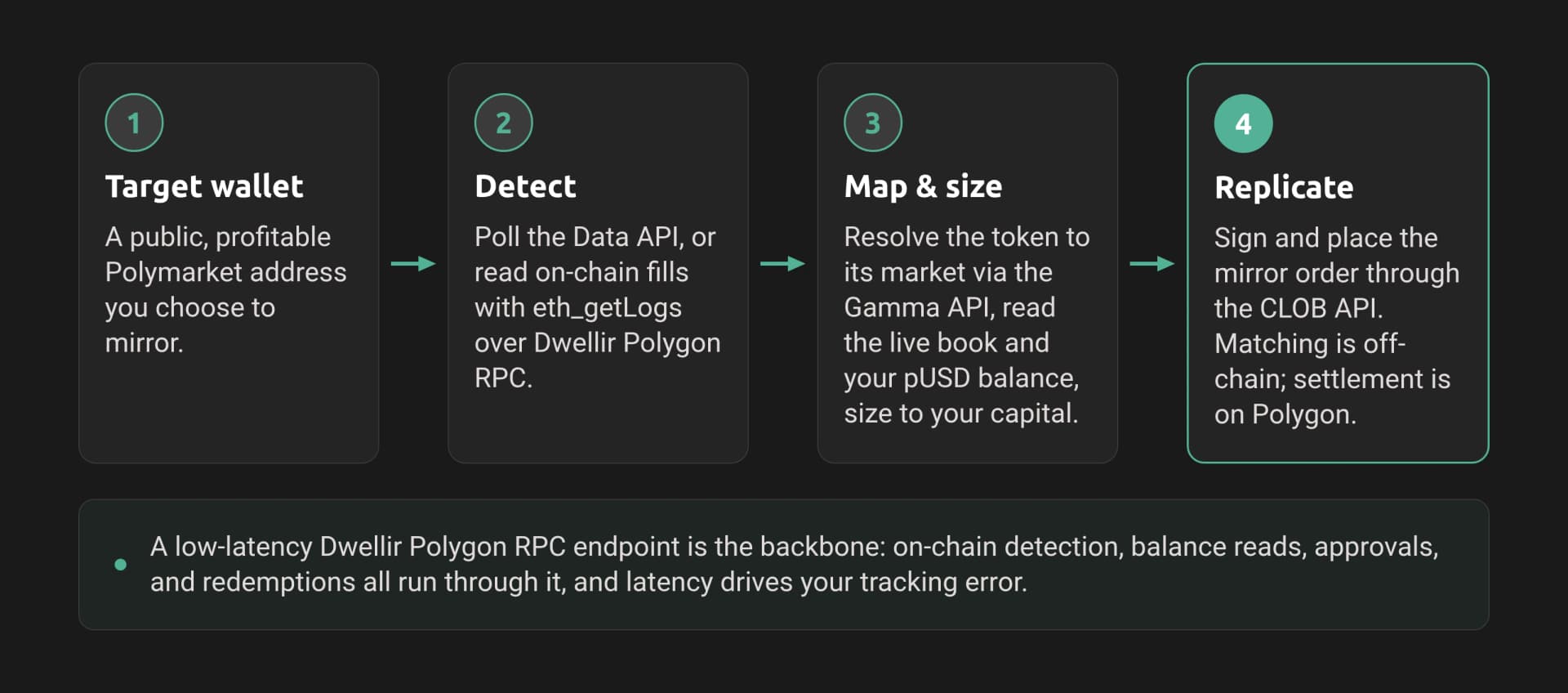
The Polymarket copy-trading bot architecture shown in the image:
- Detect a target wallet's trades via the Data API or on-chain logs.
- Map and size each trade using the Gamma API and a Polygon RPC endpoint.
- Replicate the trade through the CLOB API.
- A Dwellir Polygon RPC endpoint underpins detection, balance checks, and settlement.
Note: Polymarket shipped CLOB V2 on April 28, 2026. Collateral is now pUSD (a USDC-backed stablecoin), order signing changed, and the legacy py-clob-client no longer works against production. This guide uses py-clob-client-v2. Pin your versions.
What You Will Learn
- Detect a target wallet's trades from Polymarket's public Data API
- Map an outcome token (ERC-1155 id) to its market using the Gamma API
- Read the live order book and your on-chain balances through a Polygon RPC endpoint
- Authenticate to the CLOB API and replicate a trade sized to your capital
- Run the detect-map-size-replicate loop and harden it for production
Prerequisites
- Python 3.11+ (
python3 --version) - A Polygon RPC endpoint. Grab a free Polygon key from the Dwellir dashboard; we'll read it from
DWELLIR_POLYGON_URL. - A Polygon wallet funded with pUSD for live trading, plus a little POL for gas if your bot broadcasts its own approvals and redemptions. Reading and detecting need neither.
- Familiarity with async/await is not required; we keep the loop synchronous for clarity.
Install the dependencies:
pip install "py-clob-client-v2" web3 requestsImportant: Trading places real orders with real funds. Develop against read-only code first (Steps 1 to 3), and only wire in order placement (Step 4) once you trust the logic.
Step 1: Detect a Target Wallet's Trades
Polymarket's Data API is public and returns a wallet's actions, including every TRADE, with the outcome token, side, size, and price. We'll poll it and yield trades we have not seen before.
# detect.py
import time
import requests

DATA_API = "https://data-api.polymarket.com"

def poll_target_trades(target: str, seen: set, limit: int = 20):
    """Yield new TRADE actions for a target wallet, newest first."""
    resp = requests.get(
        f"{DATA_API}/activity",
        params={"user": target, "limit": limit},
        timeout=10,
    )
    resp.raise_for_status()
    for action in resp.json():
        if action.get("type") != "TRADE":
            continue
        tx = action["transactionHash"]
        if tx in seen:
            continue
        seen.add(tx)
        yield action
Each trade action looks like this:
{
  "type": "TRADE",
  "side": "BUY",
  "asset": "928654388472265997654...",
  "conditionId": "0x6ca4463069d6b06d08e3...",
  "outcome": "Under",
  "size": 29.99,
  "price": 0.999,
  "transactionHash": "0x779a2270c93d35eb57..."
}
The asset field is the ERC-1155 token id of the outcome the target traded. We'll use it to look up the market next.
Tip: The Data API lags the chain by a few seconds. That is fine for slower strategies; we cover the lower-latency on-chain path in the production section.
Step 2: Map the Token to Its Market
A token id alone is not tradeable; we need the market's two outcome tokens, tick size, and whether it's a neg-risk (multi-outcome) market. The Gamma API resolves a token id to its market.
# market.py
import requests

GAMMA_API = "https://gamma-api.polymarket.com"

def market_for_token(token_id: str) -> dict:
    """Resolve an outcome token id to its market via Gamma."""
    resp = requests.get(
        f"{GAMMA_API}/markets",
        params={"clob_token_ids": token_id},
        timeout=10,
    )
    resp.raise_for_status()
    markets = resp.json()
    if not markets:
        raise ValueError(f"no market for token {token_id}")
    return markets[0]
Run it against the token from Step 1:
m = market_for_token("928654388472265997654...")
print(m["question"], m["outcomes"], m["outcomePrices"])
You should see output like:
Garcia vs. Samson: Match O/U 23.5 ["Over", "Under"] ["0.0005", "0.9995"]The conditionId ties the two outcome tokens together, and clobTokenIds gives both token ids. Keep the market record; we need its conditionId and the target's asset to place an order.
Step 3: Read the Live Book and Your Balances
Before copying a trade, we check the current order book (the target's price is already stale) and confirm our own collateral. The book comes from the CLOB; balances come from Polygon directly.
# reads.py
import os
import requests
from web3 import Web3

CLOB_API = "https://clob.polymarket.com"
w3 = Web3(Web3.HTTPProvider(os.environ["DWELLIR_POLYGON_URL"]))

PUSD = Web3.to_checksum_address("0xC011a7E12a19f7B1f670d46F03B03f3342E82DFB")
ERC20_BALANCE = "0x70a08231"  # balanceOf(address)

def best_ask(token_id: str) -> float:
    """Lowest ask on the live order book for a token."""
    book = requests.get(f"{CLOB_API}/book", params={"token_id": token_id}, timeout=10).json()
    return float(book["asks"][-1]["price"]) if book.get("asks") else None

def best_bid(token_id: str) -> float:
    """Highest bid on the live order book for a token."""
    book = requests.get(f"{CLOB_API}/book", params={"token_id": token_id}, timeout=10).json()
    return float(book["bids"][-1]["price"]) if book.get("bids") else None

def pusd_balance(address: str) -> float:
    """pUSD balance (6 decimals) read via Polygon eth_call."""
    addr = Web3.to_checksum_address(address)
    data = ERC20_BALANCE + addr[2:].rjust(64, "0")
    raw = w3.eth.call({"to": PUSD, "data": data})
    return int(raw.hex(), 16) / 1_000_000
Verify the reads against a live market and your wallet:
print("best ask:", best_ask("928654388472265997654..."))
print("pUSD balance:", pusd_balance(os.environ["WALLET_ADDRESS"]))best ask: 0.999
pUSD balance: 142.50The order book read confirms the price actually available to you right now, which is what you size and quote against, not the target's already-filled price.
Step 4: Authenticate and Replicate the Trade
The CLOB uses two auth levels. Your private key (L1) signs a message to derive API credentials once; those credentials (L2) authorize every order. The SDK handles the signing.
# trade.py
import os
from py_clob_client_v2.client import ClobClient
from py_clob_client_v2.clob_types import OrderArgs, OrderType, PartialCreateOrderOptions
from py_clob_client_v2.order_builder.constants import BUY, SELL
from reads import best_ask, best_bid

HOST = "https://clob.polymarket.com"

def make_client() -> ClobClient:
    client = ClobClient(HOST, key=os.environ["PRIVATE_KEY"], chain_id=137)
    client.set_api_creds(client.create_or_derive_api_creds())
    return client
Important: create_or_derive_api_creds is deterministic, so the same key always derives the same credentials. Confirm the exact method name against your installed py-clob-client-v2 version; the README example and the source have differed across releases.
Now size the trade to your capital and place a marketable order at the live price:
def replicate(client, market, target_action, your_capital, target_capital):
    token_id = target_action["asset"]
    side = BUY if target_action["side"] == "BUY" else SELL
    # proportional sizing: match the target's allocation, scaled to your bankroll
    size = round(target_action["size"] * (your_capital / target_capital), 2)
    price = best_ask(token_id) if side == BUY else best_bid(token_id)

    order = client.create_and_post_order(
        OrderArgs(token_id=token_id, price=price, size=size, side=side),
        PartialCreateOrderOptions(neg_risk=market.get("negRisk", False)),
        OrderType.FAK,  # fill what's available now, cancel the rest
    )
    return order
We size proportionally so a whale's $50,000 position becomes a sensible fraction of your bankroll, and we use a fill-and-kill order so we take what the book offers immediately instead of resting at a stale price. The neg_risk flag must match the market or the order is rejected.
Note: Placing orders requires pUSD collateral and one-time approvals. Your wallet must approve the CTF Exchange (0xE111180000d2663C0091e4f400237545B87B996B) to spend pUSD, and call setApprovalForAll on the Conditional Tokens contract (0x4D97DCd97eC945f40cF65F87097ACe5EA0476045) for the exchange to move your outcome tokens. If you hold bridged USDC.e, wrap it into pUSD through Polymarket's collateral onramp first.
Putting It All Together
The loop ties the four steps together: poll the target, map each new trade, read the book, replicate.
# bot.py
import time
from detect import poll_target_trades
from market import market_for_token
from trade import make_client, replicate

TARGET = "0x32ed1015ee881fb4050e4d132b8e4850d85c4391"
YOUR_CAPITAL = 500.0
TARGET_CAPITAL = 50_000.0  # estimate or read from /positions

def run():
    client = make_client()
    seen = set()
    print(f"copying {TARGET}")
    while True:
        for action in poll_target_trades(TARGET, seen):
            market = market_for_token(action["asset"])
            print(f"target {action['side']} {action['size']} @ {action['price']} "
                  f"on {market['question']}")
            order = replicate(client, market, action, YOUR_CAPITAL, TARGET_CAPITAL)
            print("  replicated:", order.get("orderID", order))
        time.sleep(3)

if __name__ == "__main__":
    run()
Run it:
DWELLIR_POLYGON_URL="https://api-polygon-mainnet-full.n.dwellir.com/YOUR_KEY" \
PRIVATE_KEY="0x..." WALLET_ADDRESS="0x..." python bot.pycopying 0x32ed1015ee881fb4050e4d132b8e4850d85c4391
target BUY 120.0 @ 0.41 on Will ETH close above $4k in June?
replicated: 0x9f2c...Going to Production
The tutorial loop works, but a bot trading real money needs more.
Lower-latency detection. Polling the Data API costs you seconds. For competitive copy-trading, subscribe to on-chain fills instead: watch the Conditional Tokens TransferSingle and TransferBatch events and the exchange OrderFilled events for your target via eth_subscribe over a WebSocket Polygon endpoint, then map the token id to a market as in Step 2. Derive the event topic from its canonical signature and confirm it against a live PolygonScan log rather than hardcoding a hash. This is exactly where a low-latency Polygon RPC endpoint pays for itself.
Slippage and sizing controls. Cap the price you'll pay above the target's fill, skip markets thinner than your order size, and never let one position exceed a set fraction of your bankroll. Read the live /book depth, not just the best level.
Approvals, wrapping, and redemptions. Set approvals once at startup and verify them with allowance reads. After a market resolves, redeem winning positions with redeemPositions on the Conditional Tokens contract (or via the Neg Risk Adapter for multi-outcome markets) so capital does not sit idle.
Reliability. Wrap every API call in retry-with-backoff, treat HTTP 429 as a signal to slow down, and persist seen transaction hashes so a restart does not re-copy old trades.
Next Steps
- Add a position monitor that reads the target's
/positionsand exits when they exit. - Subscribe to the CLOB user WebSocket channel to track your own fills in real time.
- Read the best Polygon RPC for Polymarket copy-trading bots to pick an endpoint with the latency and
eth_getLogsreliability this workload needs.
This guide read and traded against Polygon through a Dwellir endpoint. To run it yourself, create a free Dwellir account and point DWELLIR_POLYGON_URL at your Polygon endpoint.
Frequently Asked Questions
How does a Polymarket copy-trading bot work?
It detects a target wallet's trades, maps each traded token to its market, then replicates the orders through the Polymarket CLOB API on Polygon.
What infrastructure do I need?
A Polygon RPC endpoint for on-chain reads and positions, plus Polymarket CLOB API credentials for order placement.
Can the bot place orders automatically?
Yes, after authenticating to the CLOB API. The guide covers reading the live book, checking balances, replicating orders, and going to production.
Build a Real-Time Base Flashblocks Visualizer with Next.js
Build a Base flashblocks visualizer with Next.js and raw JSON-RPC. Compare 200ms pre-confirmations to 2s block finality side-by-side.
How Hyperliquid funding rates work
How Hyperliquid funding rates work: the hourly premium-plus-interest formula, who pays whom, and how to fetch current, predicted, and historical rates.