
How Hyperliquid funding rates work
How Hyperliquid funding rates work: the hourly premium-plus-interest formula, who pays whom, and how to fetch current, predicted, and historical rates.


A trader holding a $250,000 long BTC perp on Hyperliquid while funding sits at 0.0025% per hour pays about $150 per day to the shorts on the other side. Flip the sign and that same trader earns $150 a day for holding the position. Stretch the position to $2.5M and the daily bleed crosses $1,500. Over a multi-week hold, funding routinely dwarfs the trading fees you obsess over, yet most traders never measure it until it shows up in their PnL.
This guide explains what funding rates are, exactly how Hyperliquid computes them, and how to pull current, predicted, and historical funding through the Hyperliquid Info API so you can price the carry on any position before you open it.
Prerequisites
You will need:
- Python 3.9+ with
requestsinstalled (pip install requests). - A Dwellir account and API key for the Info API proxy. The free tier gives you 100,000 requests per day, which is plenty for funding monitors and account reads. Grab a key from the Dwellir dashboard and see the Hyperliquid docs for setup.
- Basic familiarity with perpetual futures. If you are tracking positions and PnL end to end, the Hyperliquid whale tracking guide and the real-time liquidation tracker guide cover the adjacent account and event queries.
A note on the read/write split before you start. Reading market data and account state runs through Dwellir's Info API proxy, with edge servers in Singapore and Tokyo for low latency to the Hyperliquid core. Order placement does not: writes go straight to Hyperliquid's native exchange endpoint at https://api.hyperliquid.xyz/exchange and require EIP-712 signatures from your wallet. This guide is entirely about reads.
What funding rates are and why perpetuals need them
A perpetual future has no expiry, so there is no settlement date to force its price back toward the underlying asset. Funding is the mechanism that does that job. It is a periodic payment exchanged directly between long and short position holders, sized so that whichever side is "too crowded" pays the other.
When the perp trades above the spot oracle price, longs are paying a premium to be long, so funding goes positive and longs pay shorts. That payment makes holding a long more expensive and holding a short more attractive, nudging the perp price back down toward spot. When the perp trades below spot, funding goes negative and shorts pay longs. The exchange itself takes no cut of funding on Hyperliquid; it is a pure transfer between traders.
For you as a trader or quant, funding is two things at once: a cost of carry you must budget for on any directional hold, and a yield you can harvest if you position on the receiving side. Both require measuring the rate, not guessing it.
How Hyperliquid computes funding
Hyperliquid pays funding every hour, which is more frequent than the 8-hour cadence on many centralized venues. The hourly rate is one-eighth of an 8-hour-equivalent rate built from two parts: a fixed interest rate and a market-driven premium.
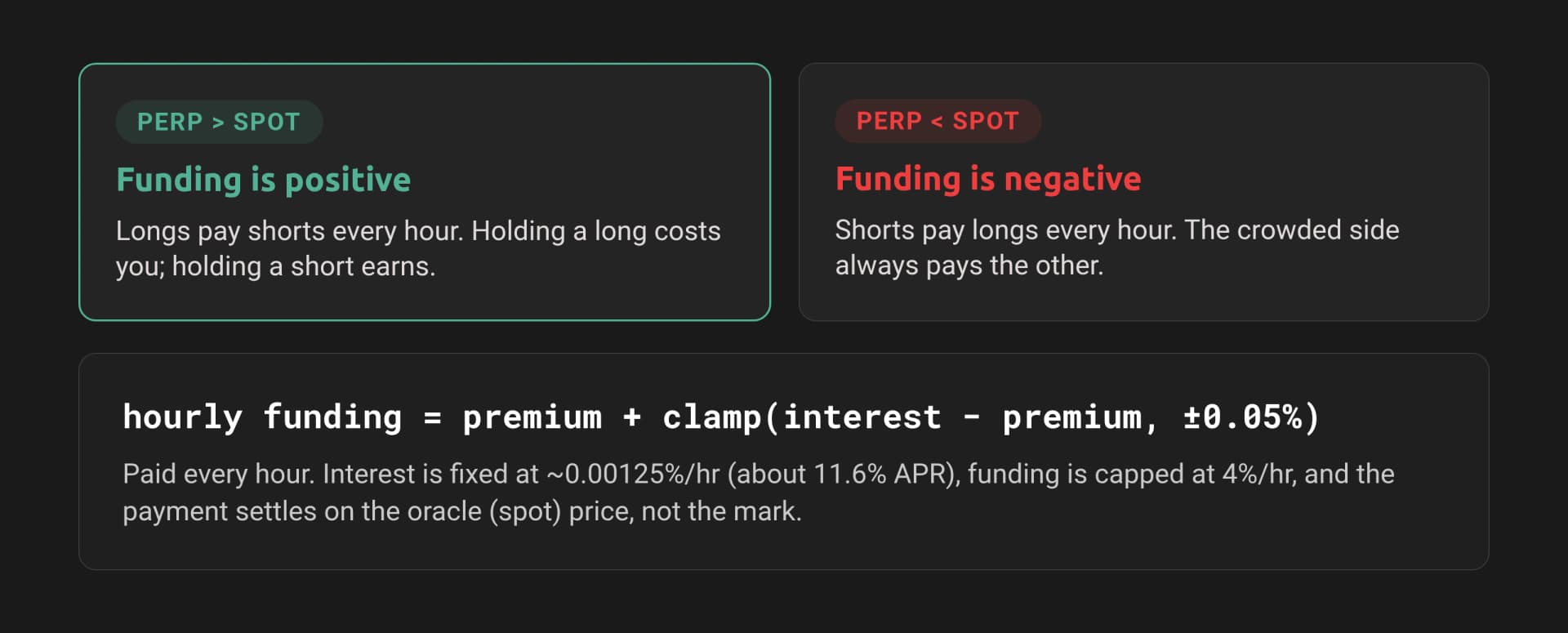
How Hyperliquid funding works, shown in the image:
- When the perp trades above the spot oracle, funding is positive and longs pay shorts.
- When the perp trades below spot, funding is negative and shorts pay longs.
- Hourly funding = premium + clamp(interest - premium), capped at 4% per hour and settled on the oracle price.
The formula Hyperliquid publishes is:
Funding Rate (F) = Premium Index (P) + clamp(interest rate - P, -0.0005, 0.0005)The interest rate is fixed at 0.01% per 8-hour interval, which is 0.00125% per hour, or roughly 11.6% APR accruing toward short positions. The premium index P is the average premium of the perp over the oracle price, sampled every 5 seconds across the hour. Each sample is:
premium = impact_price_difference / oracle_price
impact_price_difference = max(impact_bid_px - oracle_px, 0) - max(oracle_px - impact_ask_px, 0)
The impact prices are the bid and ask you would get for a reference-sized order, so the premium reflects real executable depth rather than the top-of-book midpoint. The clamp(..., -0.0005, 0.0005) term bounds how far the interest-rate component can pull the rate when the premium is small, so in calm markets funding hovers near the interest rate and in trending markets it tracks the premium. Hyperliquid also caps funding at 4% per hour against extreme conditions.
One detail that changes your PnL math: funding settles on the oracle (spot) price, not the mark price. The payment for a position over one hour is:
funding_payment = position_size * oracle_price * hourly_funding_rateA positive result means you pay; negative means you receive. The sign of position_size carries your side, so a long is positive size and a short is negative size.
The funding value you read from the API is already the hourly rate. Do not divide it by 8 again. If you want an annualized figure for comparison, multiply the hourly rate by 24 and by 365 (hourly * 8760).
Mapping the data you want to an Info API request
Three Info API query types cover everything funding-related. Note where each one lives: market-data aggregates run on Hyperliquid's public Info endpoint, while per-account reads run through Dwellir's proxy.
| Data you want | Request type | Endpoint | Returns |
|---|---|---|---|
| Current funding + mark/oracle price for every perp | metaAndAssetCtxs | Public Info | funding, markPx, oraclePx, premium, openInterest per asset, plus maxLeverage metadata |
| Predicted next funding across venues (HL vs Binance, Bybit) | predictedFundings | Public Info | [coin, [[venue, {fundingRate, nextFundingTime, fundingIntervalHours}]]] tuples |
| Historical funding rate series for one asset | fundingHistory | Public Info | [{coin, fundingRate, premium, time}] per hour |
| Your realized funding payments | userFunding / userFills | Public Info | Per-event funding deltas for an address |
| Your open positions and margin | clearinghouseState | Dwellir proxy | assetPositions, marginSummary |
Per the Dwellir Info API reference, metaAndAssetCtxs, predictedFundings, and fundingHistory are market-data aggregates that are served from the public Hyperliquid Info endpoint at https://api.hyperliquid.xyz/info rather than the Dwellir proxy. Account-scoped reads such as clearinghouseState go through the Dwellir proxy. The examples below use the right endpoint for each call. A simple rule holds: if a query type returns HTTP 422 on the proxy, send it to the public endpoint.
Every Info request is a POST with a JSON body containing a type field, for example {"type": "metaAndAssetCtxs"}.
Step 1: Fetch current funding for every perp
metaAndAssetCtxs returns a two-element array. The first element is the universe metadata (asset names, size decimals, max leverage); the second is the live asset contexts in the same order, carrying funding, prices, and open interest. Zipping them by index gives you a clean per-asset view.
import requests

PUBLIC_INFO = "https://api.hyperliquid.xyz/info"


def post(url, body, headers=None):
    resp = requests.post(url, json=body, headers=headers or {}, timeout=10)
    resp.raise_for_status()
    return resp.json()


def current_funding():
    meta, ctxs = post(PUBLIC_INFO, {"type": "metaAndAssetCtxs"})
    rows = []
    for asset, ctx in zip(meta["universe"], ctxs):
        hourly = float(ctx["funding"])
        rows.append({
            "coin": asset["name"],
            "max_leverage": asset["maxLeverage"],
            "mark_px": float(ctx["markPx"]),
            "oracle_px": float(ctx["oraclePx"]),
            "hourly_rate": hourly,
            "annual_pct": hourly * 8760 * 100,
            "open_interest": float(ctx["openInterest"]),
        })
    return rows


funding = current_funding()
funding.sort(key=lambda r: abs(r["hourly_rate"]), reverse=True)
for r in funding[:10]:
    print(f"{r['coin']:>8}  hourly {r['hourly_rate']*100:+.4f}%  "
          f"annual {r['annual_pct']:+.1f}%  "
          f"mark {r['mark_px']:.4f}  oracle {r['oracle_px']:.4f}  "
          f"maxLev {r['max_leverage']}x")
This prints the ten assets with the most extreme funding right now, the direction (positive means longs pay), and the annualized equivalent so you can compare a 0.003% hourly rate against a lending yield. You also get maxLeverage straight from metadata in the same call, which matters for the carry sizing later.
Step 2: Fetch predicted fundings across venues
The current rate tells you what is accruing now. predictedFundings tells you what the next funding will be and, critically, gives you Hyperliquid's rate alongside other venues for the same coin. The response is an array of [coin, venues] tuples, where each venue entry is [venueName, {fundingRate, nextFundingTime, fundingIntervalHours}].
Watch the interval. Hyperliquid funds hourly, so its fundingIntervalHours is 1, while Binance and Bybit typically fund every 8 hours. To compare apples to apples, normalize each venue's rate to a common period before differencing.
def predicted_fundings():
    data = post(PUBLIC_INFO, {"type": "predictedFundings"})
    out = {}
    for coin, venues in data:
        per_coin = {}
        for venue_name, info in venues:
            if info is None:
                continue
            interval = info.get("fundingIntervalHours", 1)
            rate = float(info["fundingRate"])
            per_coin[venue_name] = {
                "rate_native": rate,
                "interval_hours": interval,
                "rate_hourly": rate / interval,
                "next": info.get("nextFundingTime"),
            }
        out[coin] = per_coin
    return out


pf = predicted_fundings()
for coin in ("BTC", "ETH", "HYPE"):
    venues = pf.get(coin, {})
    hl = venues.get("HlPerp")
    bn = venues.get("BinPerp")
    if hl and bn:
        spread = (hl["rate_hourly"] - bn["rate_hourly"]) * 8760 * 100
        print(f"{coin}: HL {hl['rate_hourly']*100:+.4f}%/h vs "
              f"Binance {bn['rate_hourly']*100:+.4f}%/h  "
              f"annualized spread {spread:+.1f}%")
Normalizing to an hourly rate, then annualizing, turns a noisy set of venue numbers into a single carry spread you can act on. A consistently positive Hyperliquid-minus-Binance spread is the signal for the cross-venue trade in the use case below.
Step 3: Pull historical funding and compute realized PnL
fundingHistory returns one record per hour for a coin from startTime onward, each with the fundingRate that was actually charged. To compute what a position would have paid, multiply each hourly rate by the notional at that hour. For a static position, notional is abs(size) * oracle_price, and since funding settles on the oracle price, use the oracle when you have it. Hyperliquid does not return the oracle in fundingHistory, so for a backward-looking estimate use the position notional you held; for precision, join against an oracle/mark series from candles.
import time


def funding_history(coin, hours_back=24 * 7):
    start = int(time.time() * 1000) - hours_back * 3600 * 1000
    return post(PUBLIC_INFO, {
        "type": "fundingHistory",
        "coin": coin,
        "startTime": start,
    })


def realized_funding_pnl(coin, size, notional, hours_back=24 * 7):
    """size: signed (+long, -short). notional: position USD value, held flat."""
    history = funding_history(coin, hours_back)
    total = 0.0
    sign = 1.0 if size > 0 else -1.0
    for record in history:
        rate = float(record["fundingRate"])
        # Long pays when rate > 0, so PnL is the negative of what you pay.
        payment = sign * notional * rate
        total -= payment
    direction = "earned" if total >= 0 else "paid"
    print(f"{coin}: over {len(history)}h a "
          f"{'long' if size > 0 else 'short'} ${notional:,.0f} position "
          f"{direction} ${abs(total):,.2f} in funding")
    return total


# Example: a $250k long BTC held flat for the past week.
realized_funding_pnl("BTC", size=1.0, notional=250_000, hours_back=24 * 7)
The sign convention is the part people get wrong, so be explicit: a long with positive funding pays out, so its funding PnL is negative. The code computes the per-hour payment as sign * notional * rate and subtracts it from PnL, so a long in a positive-funding regime shows a loss and a short shows a gain. To validate against your account, pull userFunding for your address and reconcile; small differences come from notional drift as price moved during the hold.
Use case: funding-rate arbitrage and carry
Funding is a yield source, and the cleanest harvest is the cash-and-carry trade. When Hyperliquid funding on an asset is persistently positive, longs are paying shorts every hour. You capture that by going long the spot asset and short the perp in equal size. The short perp collects funding while the spot leg neutralizes your price exposure, so your PnL is dominated by the funding stream minus fees and any spot borrow cost. When funding is persistently negative, you flip the legs: short spot (or hold none) and go long the perp to collect.
Two practical checks decide whether the trade is worth it:
- Annualize before you commit. A 0.0015% hourly rate looks tiny but annualizes to roughly 13%. Compare that to your fee drag (entry, exit, and any rebalancing) and to the risk-free yield on the capital. Use the
annual_pctfield from Step 1. - Size against max leverage, read from metadata. The perp leg lets you post less margin, but Hyperliquid sets a different ceiling per asset. BTC sits in the top tier and supports up to 40x, while most assets cap in the 3x to 10x range. Never hardcode this; read
maxLeveragefrommeta["universe"]as Step 1 does, because the value changes per asset and over time.
The cross-venue version uses Step 2. If Hyperliquid funding on a coin runs structurally above Binance for the same coin, you short the perp on Hyperliquid (collecting the higher rate) and long the perp on Binance (paying the lower rate), staying delta-neutral across the two venues and pocketing the normalized spread. The predictedFundings feed is what surfaces those spreads before the next funding stamp lands.
Production tips
- Cache the semi-static parts. The
meta["universe"]block (asset names, size decimals, max leverage) changes rarely. Cache it for minutes to hours and refresh only the asset contexts. Do not re-pull full metadata on every poll. - Batch with
metaAndAssetCtxs. One call returns funding and prices for every perp. Do not loop per-coin requests when a single batched call covers the whole universe. - Respect rate limits and back off. Funding only updates hourly, so polling current funding every few seconds wastes your quota and tells you nothing new. Poll on the order of once a minute for monitors, and align historical pulls to the hourly stamp. The free tier's 100,000 requests per day is generous if you are not hammering it.
- Route each query to the right endpoint. Send market-data aggregates (
metaAndAssetCtxs,predictedFundings,fundingHistory) to the public Info endpoint, and send account reads (clearinghouseState) through the Dwellir proxy with your API key. A 422 from the proxy is your cue to fall back to the public endpoint. - Validate freshness. Query
exchangeStatusto check the L1 timestamp before you trust a funding read in a live trading loop, and reject stale snapshots.
Wrapping up
Funding is a measurable, predictable cost and yield that compounds hourly on every perp position you hold. With three Info API request types, metaAndAssetCtxs for the current rate, predictedFundings for the next stamp across venues, and fundingHistory for the realized series, you can price the carry on any Hyperliquid perp before you open it and harvest it when the rate pays you to.
Read those market-data feeds from the public Info endpoint, route your account reads through Dwellir's Info API proxy on edge servers in Singapore and Tokyo, and keep order placement on Hyperliquid's native exchange endpoint. Sign up for a Dwellir API key and start with the Hyperliquid Info endpoint docs.
References
- Dwellir Hyperliquid docs
- Dwellir Info endpoint reference
- Hyperliquid funding rate spec
- Hyperliquid whale tracking guide
- Building a real-time Hyperliquid liquidation tracker
- Hyperliquid endpoint options beyond public RPC
Frequently Asked Questions
How does Hyperliquid compute funding rates?
Funding is an hourly premium-plus-interest rate that keeps the perpetual price near the index. The guide walks through the formula and the Info API requests to fetch it.
Can I get predicted and historical funding, not just current?
Yes. The guide fetches current funding for every perp, predicted fundings across venues, and historical funding so you can compute realized PnL.
What can funding-rate data be used for?
Funding-rate arbitrage and carry strategies. The guide includes a worked example of the funding carry trade.
How to Build a Polymarket Copy-Trading Bot
Build a Polymarket copy-trading bot in Python: detect a target wallet's trades, map them to markets, and replicate orders through the CLOB API on Polygon.
How to Track Hyperliquid Whales in Real Time
Build a Hyperliquid whale tracker in Python. Stream large fills over gRPC, surface big resting orders, and read whale positions through Dwellir's read infra.