Builder codes have generated $40M+ in revenue for Hyperliquid application developers. But most integration guides stop at isolated code snippets, leaving you to figure out the plumbing: wallet signing flows, session-scoped agent keys, deposit orchestration, and the chainId 1337 problem that breaks every major wallet provider.
We built an open-source demo app that implements the complete builder code lifecycle in a single Next.js application. It is MIT-licensed, works on both testnet and mainnet, and covers every step from approval to order placement to revocation. Clone it, swap in your builder address, and start earning fees.
This post walks through the architecture, the implementation patterns that matter, and how to get it running.
What the Demo Does
The app is a guided wizard that walks through 7 steps covering the full builder code lifecycle:
- Check approval status - Read-only query to see if your wallet has approved the builder address
- Approve builder fee - Sign an EIP-712 message authorizing a maximum fee rate
- Deposit USDC - Transfer USDC from Arbitrum to Hyperliquid (skipped if you already have a balance)
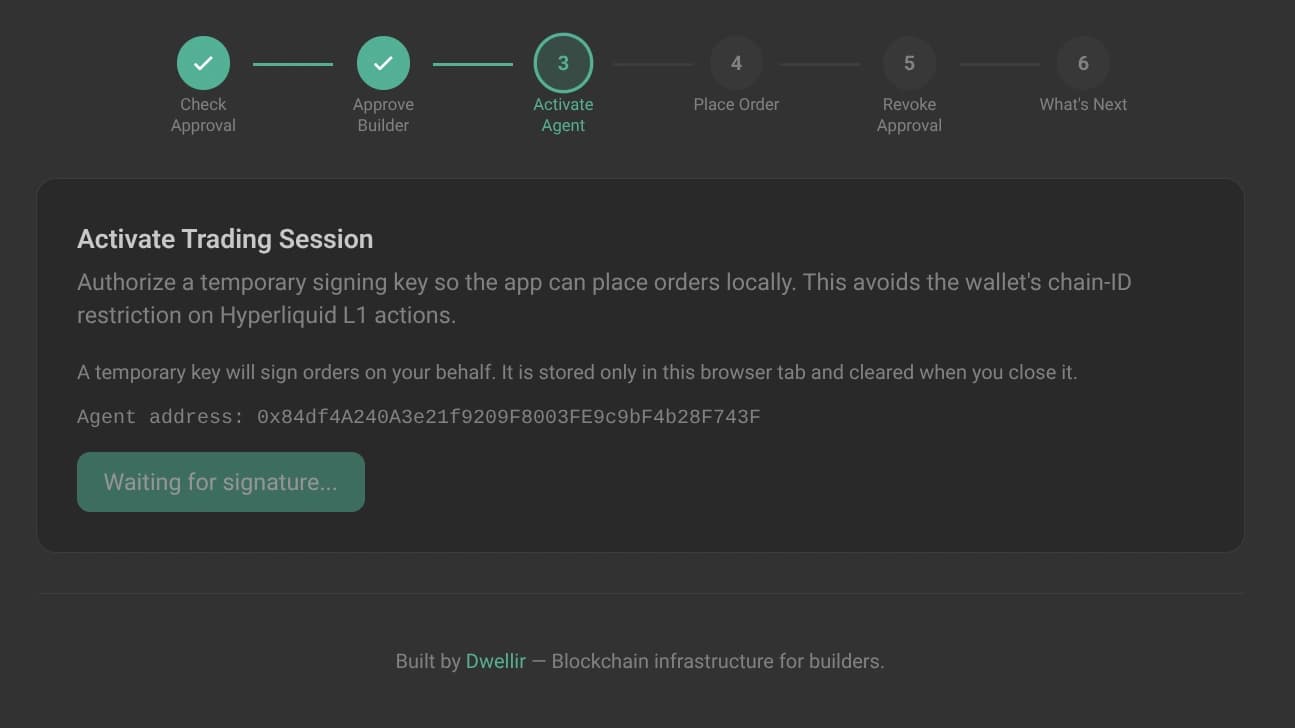
- Activate agent - Approve a temporary session key for order signing
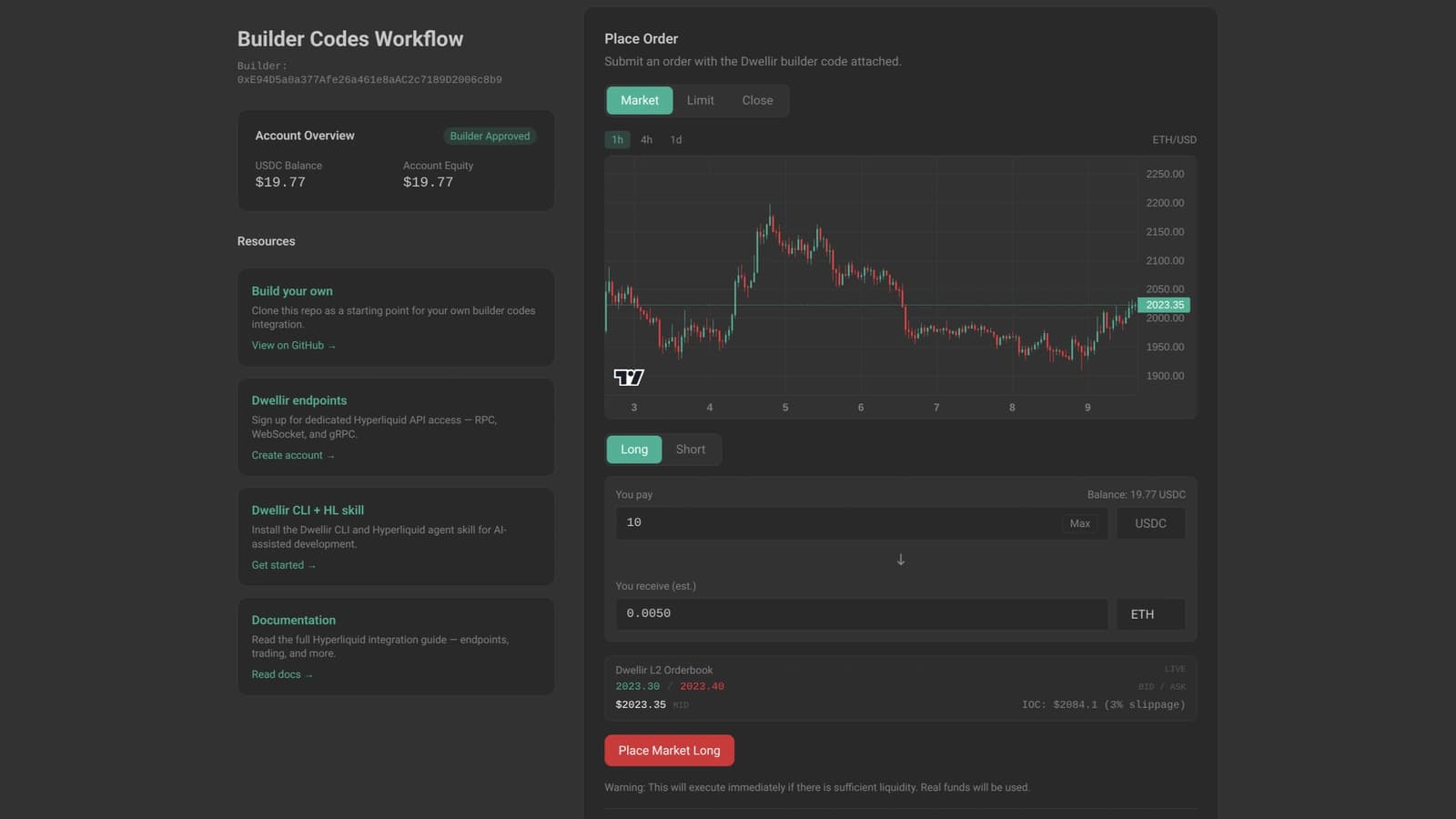
- Place order - Submit a market or limit order with the builder code attached
- Revoke approval - Set the max fee to 0% to remove the builder's permission
- What's next - Links to clone the repo, sign up at Dwellir, and explore docs
Each step includes live account balances, an L2 order book feed, candlestick charts, and human-readable transaction results. The wizard auto-skips completed steps on load, so returning users jump straight to where they left off.
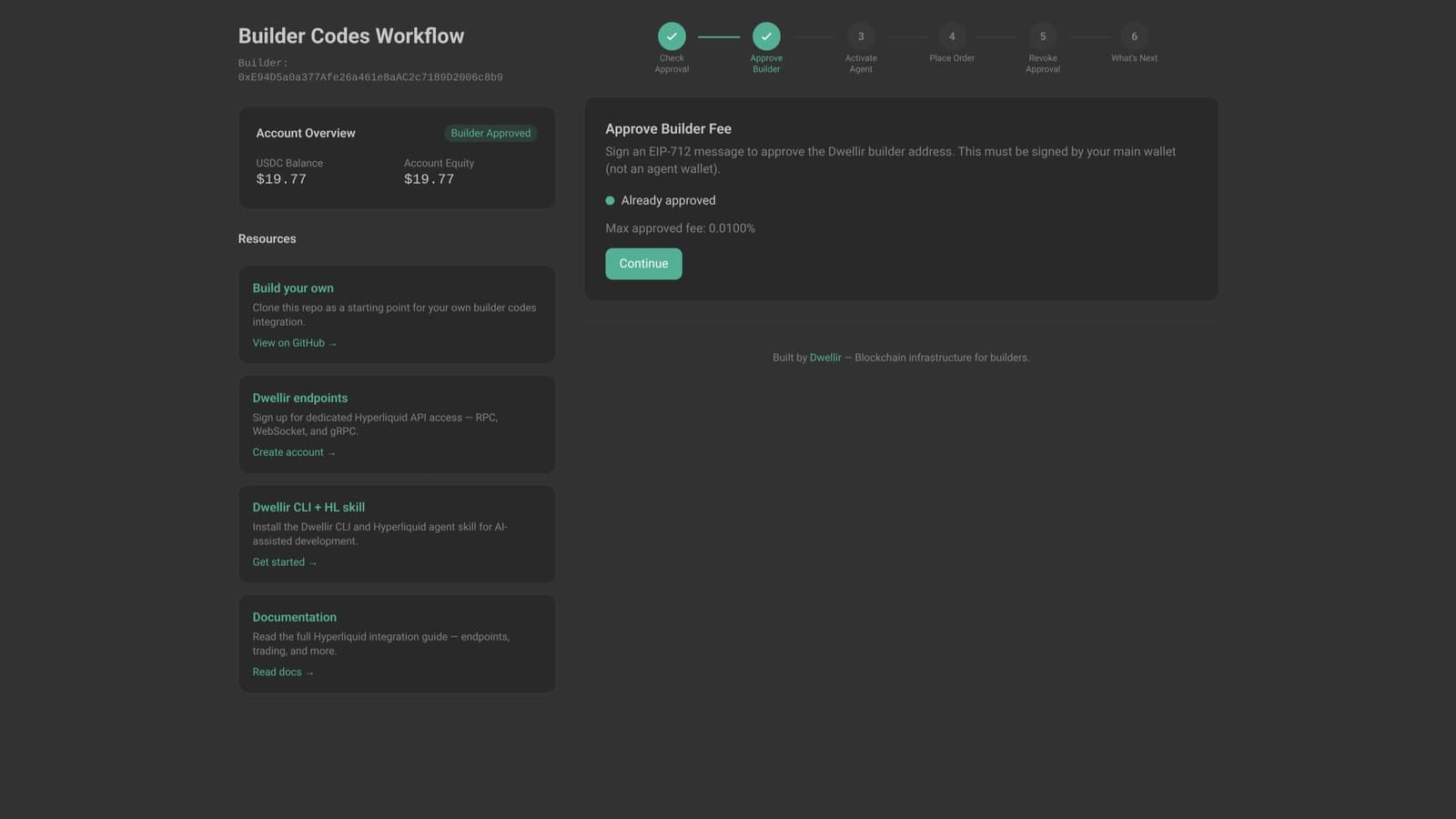
The sidebar provides quick access to account balances, resource links, and builder fee status. The Dwellir L2 orderbook feed shows live bid/ask data directly in the interface:

Architecture: Solving the ChainId 1337 Problem
The trickiest part of building on Hyperliquid is not the builder code itself. It is getting wallet signatures to work.
Hyperliquid L1 actions (orders, cancels) use EIP-712 typed-data signatures with a domain chainId of 1337. This does not match any real chain. MetaMask, WalletConnect, and other wallet providers reject the signature because the domain chain ID does not match the active network.
The official Hyperliquid app solves this with agent keys, and the demo uses the same approach:
- The app generates a random private key in the browser using viem's
generatePrivateKey() - The key is stored in
sessionStorage(cleared when you close the tab) - You sign an
approveAgenttransaction via your wallet. This uses chainId 42161 (Arbitrum), which your wallet accepts - All subsequent orders are signed locally in JavaScript with the agent key. No wallet popup, no chain-ID validation problem
The agent key is scoped to your wallet address, authorized only for trading actions (it cannot withdraw funds), and lives only for the duration of your browser session.
This pattern separates two concerns: authorization (your real wallet, on a real chain) and execution (an ephemeral key, signing L1 actions locally). The demo implements both sides.
Key Implementation Patterns
The following patterns come directly from the demo repository. Each one solves a specific integration challenge.
Builder Fee Approval
Users must approve your builder fee before you can charge it. This is a one-time EIP-712 signature on Arbitrum:
// src/components/ApproveBuilder.tsx
await walletClient.approveBuilderFee({
  builder: DWELLIR_BUILDER_ADDRESS,
  maxFeeRate: '0.0100%', // 1 basis point
});
The fee parameter uses a percentage string format. In the demo's constants, a helper converts the raw integer (tenths of basis points) to the SDK's expected format:
// src/config/constants.ts
export const DEFAULT_BUILDER_FEE = 10; // 10 tenths-of-a-bps = 1 bps = 0.01%

export function feeToPercent(fee: number): string {
  return `${(fee / 100).toFixed(4)}%`;
}
The app polls the approval status using maxBuilderFee() via React Query, so the UI updates automatically once the transaction confirms:
// src/hooks/useBuilderApproval.ts
const { data: maxFee } = useQuery({
  queryKey: ['maxBuilderFee', network, address, builder],
  queryFn: () => queryMaxBuilderFee(network, address, builder),
  refetchInterval: network === 'mainnet' ? 5_000 : 10_000,
});
Agent Wallet Session Management
The agent wallet hook generates, stores, and manages ephemeral keys:
// src/hooks/useAgentWallet.tsx
const approveAgent = async () => {
  const pk = generatePrivateKey();
  const account = privateKeyToAccount(pk);

  // Register with Hyperliquid via your real wallet (chainId 42161)
  await userWalletClient.approveAgent({
    agentAddress: account.address,
    agentName: 'DwellirBuilder',
  });

  // Store in sessionStorage for the tab's lifetime
  sessionStorage.setItem(`hl-agent-key-${userAddress}`, pk);
};
The key is shared across the app via React Context. Any component that needs to place or cancel orders consumes the agent wallet client, which signs L1 actions (chainId 1337) entirely in memory without touching the user's wallet.
Order Placement with Builder Code
With the agent wallet active, placing an order with builder code attribution is a single call:
// src/components/PlaceOrderStep.tsx
await agentWalletClient.order({
  orders: [{
    coin: selectedAsset,
    isBuy: side === 'buy',
    sz: size,
    limitPx: price,
    orderType: { limit: { tif: 'Gtc' } },
    reduceOnly: false,
  }],
  builder: {
    b: DWELLIR_BUILDER_ADDRESS,
    f: DEFAULT_BUILDER_FEE,
  },
});
The builder field is the entire integration point. The b parameter is your builder address, and f is the fee in tenths of basis points. The protocol enforces the caps: 10 bps max for perpetuals, 100 bps max for spot.
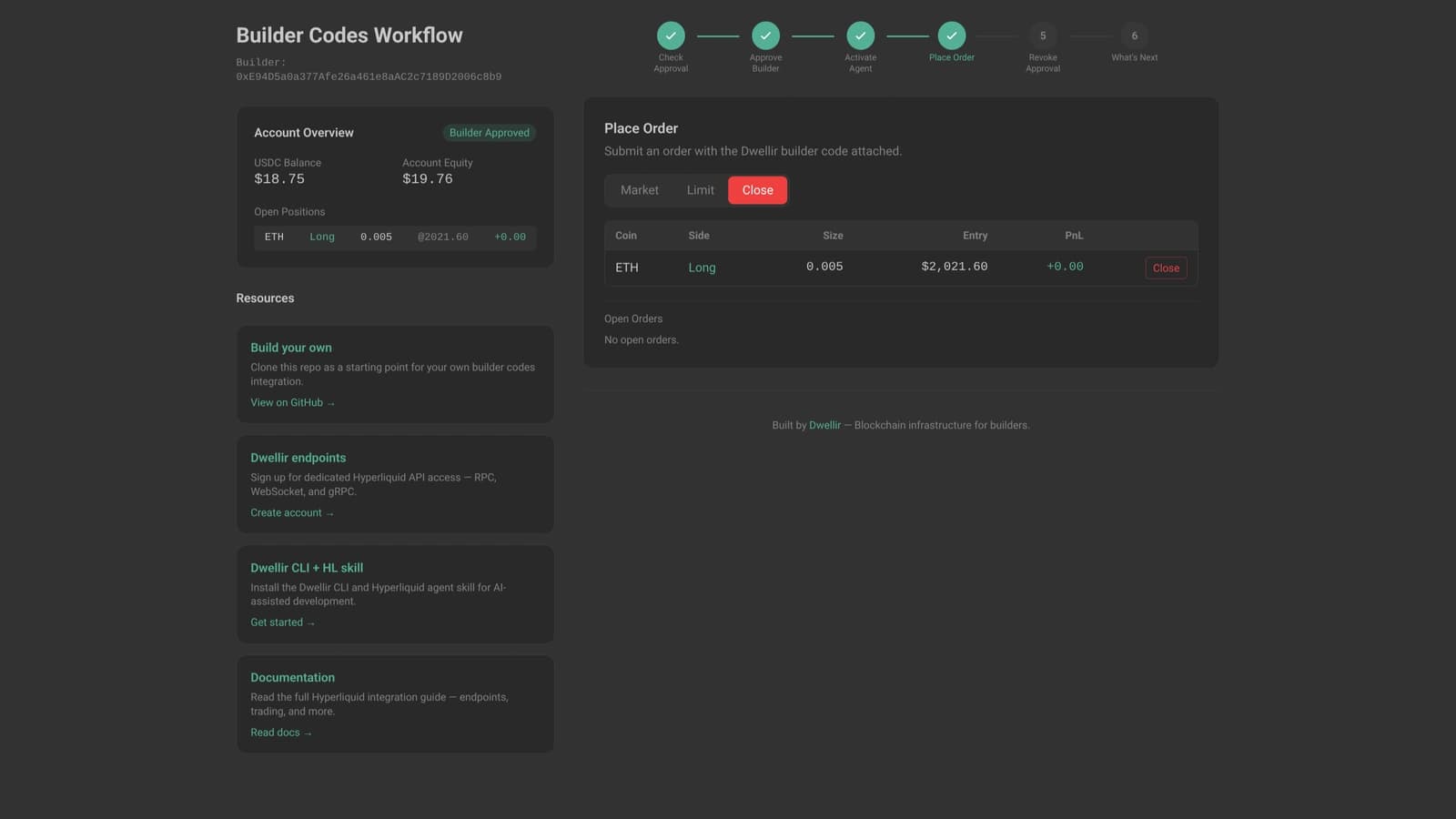
After execution, the app shows the open position with entry price, PnL, and a close button:
Dwellir Endpoint Routing
The demo optionally routes requests through Dwellir's optimized infrastructure when an API key is present:
// src/config/constants.ts
const DWELLIR_API_KEY = process.env.NEXT_PUBLIC_DWELLIR_API_KEY;

const mainnetConfig = {
  infoUrl: DWELLIR_API_KEY
    ? `https://api-hyperliquid-mainnet-info.n.dwellir.com/${DWELLIR_API_KEY}/info`
    : 'https://api.hyperliquid.xyz/info',
  wsUrl: DWELLIR_API_KEY
    ? `wss://api-hyperliquid-mainnet-orderbook.n.dwellir.com/${DWELLIR_API_KEY}/ws`
    : 'wss://api.hyperliquid.xyz/ws',
};
This pattern lets the app work out of the box with public endpoints while giving production deployments access to higher rate limits, deeper order book data, and lower latency through Dwellir's managed infrastructure. No code changes required, just set an environment variable.
Running It Yourself
Prerequisites
- Node.js 18+
- A browser wallet (MetaMask recommended)
- A WalletConnect project ID (free)
Quick Start
git clone https://github.com/dwellir-public/hyperliquid-builder-codes-demo.git
cd hyperliquid-builder-codes-demo
npm install
cp .env.local.example .env.local
Edit .env.local with your WalletConnect project ID:
NEXT_PUBLIC_WALLETCONNECT_PROJECT_ID=your_project_id_hereThen start the dev server:
npm run devOpen http://localhost:3000. The app defaults to mainnet. To experiment on testnet without risking real funds, change the default network in src/components/Providers.tsx:
const [network, setNetwork] = useState<NetworkKey>("testnet"); // change "mainnet" → "testnet"The codebase has full testnet support (endpoints, contract addresses, wallet chain switching), so everything works the same way — just against Hyperliquid's testnet environment.
Customizing for Your Builder Address
Swap in your own builder address and fee rate in src/config/constants.ts:
export const DWELLIR_BUILDER_ADDRESS = '0xYOUR_BUILDER_ADDRESS';
export const DEFAULT_BUILDER_FEE = 10; // Adjust fee rate (tenths of bps)
For production, add a Dwellir API key to route through managed infrastructure:
NEXT_PUBLIC_DWELLIR_API_KEY=your_dwellir_api_keyAgent Tooling for Faster Development
If you use AI coding agents, two Dwellir tools make building on Hyperliquid significantly faster.
The Hyperliquid agent skill gives agents like Claude Code, Cursor, and Windsurf procedural knowledge about Hyperliquid's API surface, including HyperEVM JSON-RPC, Info API queries, gRPC streaming, and order book WebSocket feeds. Install it with:
npx skills add dwellir-public/hyperliquid-skillsIn our benchmarks, agents with the skill shipped Hyperliquid trading dashboards 70% faster at 57% lower cost compared to agents working without it.
The Dwellir CLI gives agents and developers terminal access to endpoint discovery, API key management, and usage monitoring. An agent can provision Hyperliquid endpoints, create API keys, and check error logs without leaving the terminal.
Both tools pair well with this demo as a starting point. Point an agent at the cloned repo with the skill installed, and it has both the working reference implementation and the infrastructure knowledge to extend it.
Start Building
The builder codes demo is MIT-licensed and designed as a starting point. Fork it, swap in your builder address, and build the trading interface your users need. Whether that is a copy trading platform, a mobile-first frontend, or an automated strategy with builder fees attached, the core integration patterns are the same.
For production infrastructure with higher rate limits and deeper order book data, sign up at the Dwellir dashboard. For dedicated node clusters, contact us. Our Hyperliquid docs cover the full stack, including the order book WebSocket used here, gRPC streaming, custom JSON-RPC, Hyperliquid / HyperEVM, and processed tick data.
This demo is for educational purposes. It is a reference implementation, not a production trading interface. Building financial applications involves regulatory considerations that vary by jurisdiction. Use at your own risk.